
Evaluating a Load
Learn how to quickly decide whether a load fits your vehicle, schedule, route, and operating plan.
Finding a fresh load is only the beginning. Before preparing an offer, you need to decide whether the opportunity actually makes sense for your operation. CargoVans gives you the information needed to make that decision, but the right choice depends on your vehicle, schedule, location, costs, and where you want to go next.
Start with the complete trip
Don't judge a load from the advertised price alone. Start by looking at the entire trip from pickup to delivery. A load can have an attractive rate but still be a poor fit because of the distance, timing, weight, vehicle requirements, destination, or the additional driving it creates for you.
- Check where the load starts.
- Check where it ends.
- Confirm the pickup and delivery timing.
- Make sure the load fits your vehicle and equipment.
- Review the weight, distance, and other shipment details.
- Consider the rate together with the complete trip.
- Think about where the delivery leaves you for your next load.
1. Check the pickup
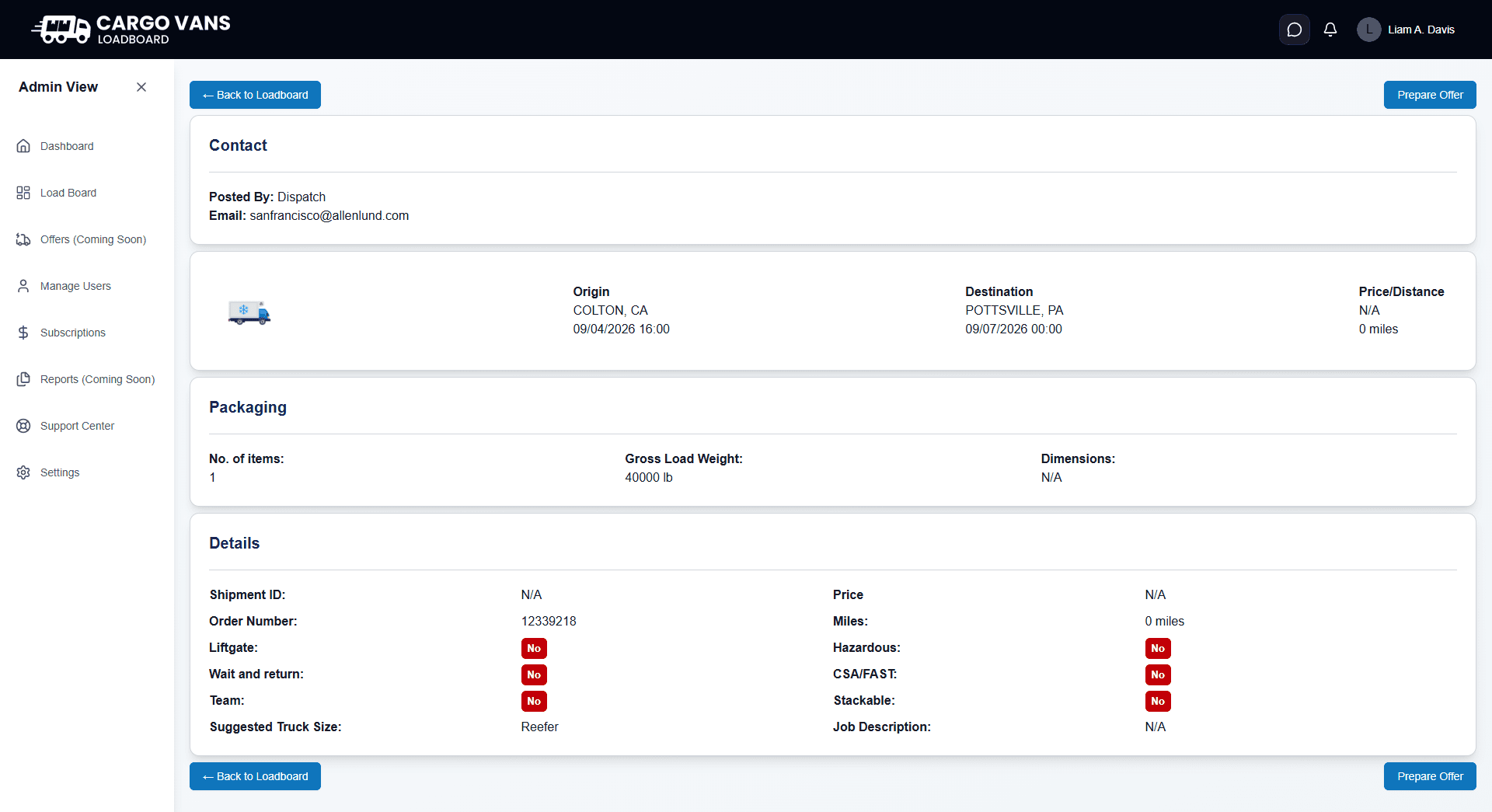
Start with the Origin section. Confirm the pickup city, state, and scheduled pickup time. The pickup location needs to work with where your vehicle is now and how you plan to reach the facility.
2. Check the destination
Next, look at the Destination section. Knowing where the load ends is just as important as knowing where it starts. The destination affects whether the trip fits your operating plan and what opportunities may be available to you afterward.
3. Check the timing
Review both the pickup and delivery times. Make sure the schedule is realistic for your operation and that you can meet the required timing without creating unnecessary pressure.
Pickup time
Make sure you can reach the pickup location in time and account for the distance from your current location.
Delivery time
Check when the load needs to reach its destination and make sure the schedule works with the trip distance.
Transit planning
Consider the complete movement between pickup and delivery rather than looking at either appointment independently.
Your availability
Compare the load schedule with your current commitments and the time your vehicle will actually be available.
4. Make sure the load fits your vehicle
The Load Information page shows the suggested truck size along with shipment information such as weight and dimensions when available. Use these details to determine whether the load is appropriate for your equipment.
- Check the suggested truck size.
- Review the gross load weight.
- Review the number of items.
- Check the dimensions when they are provided.
- Review other listed requirements before deciding to pursue the load.
5. Look at the distance
Distance is one of the most important pieces of information when evaluating a load. The Load Information page shows the listed miles for the trip. Use that number together with the price rather than evaluating either figure by itself.
Also consider the distance you may need to travel to reach pickup and what happens after delivery. The listed load distance does not necessarily represent every mile your vehicle will travel for the opportunity.
6. Look beyond the advertised price
Price is important, but it is only one part of the decision. A higher advertised price does not automatically make a load better. Compare the price with the trip distance, your positioning, timing, vehicle requirements, and the additional costs associated with moving the load.
7. Review the shipment details
The Details section contains additional information that can affect how you approach the load. Review the fields shown on the page instead of assuming every shipment has the same requirements.
- Shipment ID, the shipment identifier shown for the load.
- Order Number, the order reference shown for the opportunity.
- Liftgate, indicates whether a liftgate requirement is listed.
- Wait and return, shows whether that requirement is indicated for the load.
- Team, indicates whether a team requirement is listed.
- Suggested Truck Size, shows the suggested equipment for the load.
- Hazardous, indicates whether the load is marked as hazardous.
- CSA/FAST, shows whether that requirement is indicated.
- Stackable, indicates whether the load is marked as stackable.
- Job Description, provides additional shipment information when available.
8. Consider the trip after delivery
A load doesn't exist in isolation. Once you deliver it, you need to decide what comes next. A load that moves you toward an area where you want to find your next opportunity may be more useful to your operation than a load that leaves you far from your preferred markets.
This is where the idea of deadhead and positioning becomes important. You will learn more about those topics later in the guide, but they should already be part of your thinking when comparing loads.
A quick evaluation framework
When freight is moving quickly, you don't have to perform a long analysis on every load. Use a consistent sequence to eliminate poor fits quickly and focus your attention on the strongest opportunities.
1
Fit
First decide whether the load can physically and practically work for you.
01
Vehicle
Check the suggested truck size, weight, dimensions, and listed requirements against your equipment.
02
Location
Check the pickup and delivery locations against your current position and operating area.
2
Trip
Then understand what the load means for your schedule and total movement.
01
Timing
Review pickup and delivery timing and make sure the schedule is realistic.
02
Distance
Look at the listed miles and consider the additional driving required to reach pickup and continue after delivery.
3
Value
Finally decide whether the opportunity is worth pursuing.
01
Rate
Consider the advertised price in relation to distance and the rest of the trip.
02
Positioning
Think about where the load leaves you and whether that position supports your next move.
Before you prepare an offer
The pickup location works for me.
The delivery location works for my operating plan.
The pickup and delivery timing is realistic.
The load fits my vehicle and equipment.
The weight and dimensions are acceptable.
I understand the listed distance.
I've considered the additional driving required to reach pickup.
The price is worth considering for the complete trip.
The destination makes sense for my next move.
I've reviewed the additional load requirements and details.
What comes next
Once you've decided that a load is worth pursuing, the next step is understanding exactly what each field on the Load Information page means. The next section breaks down the page so you can confidently interpret the details before contacting the broker.